Last Thursday night Microsoft 365 clocked off without telling anyone. For a lot of businesses Outlook stayed off well into Friday, inboxes spinning politely while everyone refreshed and hoped. Nobody's email was lost: the backlog turned up later in a heap, slightly out of order, like a postie back from holiday. Now the dust has settled, here is a question worth asking whether you live on Microsoft 365, Google Workspace, Dropbox or a bit of everything: when the company holding your data has a bad day, what can you actually get to?
In short
No email was lost. The outage did show who was holding it, though, and for most businesses it wasn't them.
The same is true of Google Workspace, Dropbox, Box, iCloud and every other service you sign in to. You rent the space. The copy is theirs.
Owning your data doesn't mean leaving the cloud. It means a complete copy that you can reach without asking the company that went down.
Five questions are worth ten minutes this week. They're at the bottom.
What actually happened
Just after 4pm on Thursday 12 November in London, in the small hours of Friday in Melbourne, people started losing access to their mailboxes in Exchange Online. Outlook on the web, the Outlook app and mail on phones all failed. Two hours later Microsoft opened a second incident for everything that leans on Exchange: Teams calendars and invites, parts of SharePoint, Copilot and some of its own security tools. By that evening Downdetector had logged about 140,000 reports from 74 countries.
Microsoft's own updates read like a long night. A number of servers became unavailable and the rest couldn't carry the load. Servers it brought back fell over again as soon as traffic returned. It paused changes, rolled back a recent network configuration change, throttled traffic and added capacity. Early on Friday it said there was no sign of malicious activity. By Friday evening UK time it said people could get in again while it worked through a backlog of queued mail, and that it would now hold delayed messages for 48 hours.
Microsoft has promised a full post-incident report. That will tell us the exact cause. It won't change the lesson much. (We wrote about it as it happened: Microsoft 365 went down. Who holds a copy of your data?)
The ripple effect, from airports to fax machines
The outage went round the world in a day, and the news filled up with examples of what happens when the one place your work lives goes quiet.
Airlines. IndiGo and Akasa Air in India warned that their customer support email was down. Air India rerouted its email to keep talking to passengers. Cathay Pacific said its flights were running normally, but passengers on Microsoft email might not get their flight notifications.
Healthcare. In the UK, where much of the NHS calendar runs on Microsoft, some operations were reported cancelled and electronic prescriptions had problems. In Ireland, the HSE's Healthmail was hit and GPs and pharmacists were told to go back to paper prescriptions.
Money. Traders went back to the phone, and at least one Taiwanese firm used a fax to confirm trades. A European bond repurchase was halted. Richemont briefly delayed its half-year results, Workhorse Group moved its results to 16 November, and Aviva switched to backups for its earnings calls.
Shipping and logistics. Maersk warned customers that updates would be late. In Japan, Sagawa Express couldn't take online bookings for its airport luggage service.
Government. Australia's spy agency and federal police were among the organisations caught up, and the government activated an agreement to get Australian services prioritised in the recovery. Japan confirmed disruption to the network its civil servants use every day.
Small businesses. In Australia, the ABC reported shops losing sales that came in by email, patients losing access to telehealth, and distance-education schools shutting for the day.
Morningstar DBRS put global insured losses at US$300 million to US$500 million, against US$400 million to US$1.5 billion for the CrowdStrike outage in 2024. That's only the insured part. Nobody has a figure for a day of not being able to find the quote.
The data was fine. Getting to it wasn't.
Nothing went missing. Mailboxes, OneDrive and SharePoint files sat there the whole time, and most email sent during the outage did turn up in the end.
But from Thursday night and through most of Friday, a lot of businesses couldn't open the one place their email lived. Files already synced to a laptop were fine. Anything that only lived in a browser tab wasn't. The phone list was in Outlook. The quote was attached to an email. The meeting invite never came.
Studios on Google Workspace carried on as normal, and so did files in Dropbox. That's luck of the draw, not virtue. Google, Dropbox and every other provider have bad days too, and when theirs comes the same question applies, with a different logo on it.
The view from our desk
Some of the first messages we got were people asking whether it was their Mac. It wasn't. "It's not you, it's them" is a useful thing to be able to say quickly, so last week we put up a public status page. It checks Microsoft, Google, Apple and the everyday tools studios run on, every few minutes, and says whether each one is working. Anyone can use it: help.thatmacchap.com/status.
Our own help@ mailbox is on Microsoft 365 too. A few of our replies didn't leave when we thought they had, so we checked each one and sent it again once Microsoft was answering. A small, slightly embarrassing version of exactly what this post is about.
On Friday morning we emailed every client. For those on Microsoft, the note said when their last backup had finished and how much of their data we were holding outside Microsoft's cloud. Every one of them had a complete copy from the night before. For those on Google, it said what would happen if Google ever had a day like that.
Somebody here started calling it Microsoft 364. It stuck.
Renting is fine. Renting with no copy isn't.
With Microsoft 365, Google Workspace, Dropbox or Box you're a tenant. They're good buildings and the landlords are better at plumbing than any of us. Nobody should be running their own email server or file server in a cupboard.
Owning your data is smaller and more practical than leaving. It means a complete copy, held somewhere other than the provider, that someone you trust can get into without the provider's help. It means that copy is recent, keeps earlier versions, and is in a form you could take elsewhere if you ever moved.
And outages are the easy case, because they end. The things that really cut you off are quieter. A former colleague's mailbox or Google account that is deleted for good a few weeks after they leave. A shared Dropbox or Drive folder tidied away by mistake, and then the bin emptied after it. A deletion on one laptop that syncs straight to everyone else's. Ransomware that encrypts everything that syncs. Every provider keeps deleted things for a while and then lets them go. In each of those cases the provider is working perfectly, and your data is still gone, unless you have a copy.
Five questions worth ten minutes this week
Where is our copy? Not "in the cloud". A named place, outside Microsoft, Google, Dropbox or whoever holds the original.
When did it last finish? The answer you want is "last night".
Who can get into it, and how quickly? If the only answer is the provider, it isn't really a copy.
Does it keep earlier versions? A copy of last night's encrypted files is a copy of the problem.
Could we leave? If you changed provider next year, how would the data move and how long would it take?
Ask them about each service you rely on, not just email. And one for good measure: is your phone list somewhere other than your email?
Not sure of your answers?
Every night we back up Microsoft 365, Google Workspace, Dropbox, Box and the other services studios rely on. The Macs they work on are backed up through the day. We keep earlier versions and hold the copy on our own secure storage, outside the provider's cloud, and the backup never deletes anything.
A backup only counts if someone checks it. Ours report every night in words, not error codes: who was backed up, what was skipped on purpose, and anyone who wasn't, by name. Anything missed gets fixed the next morning, not on the day you need it. Below is what that looks like.
Want to know who holds a copy of your data? Ask us at help@thatmacchap.com and we'll tell you where it is, or isn't. Or read more about backup and disaster recovery.
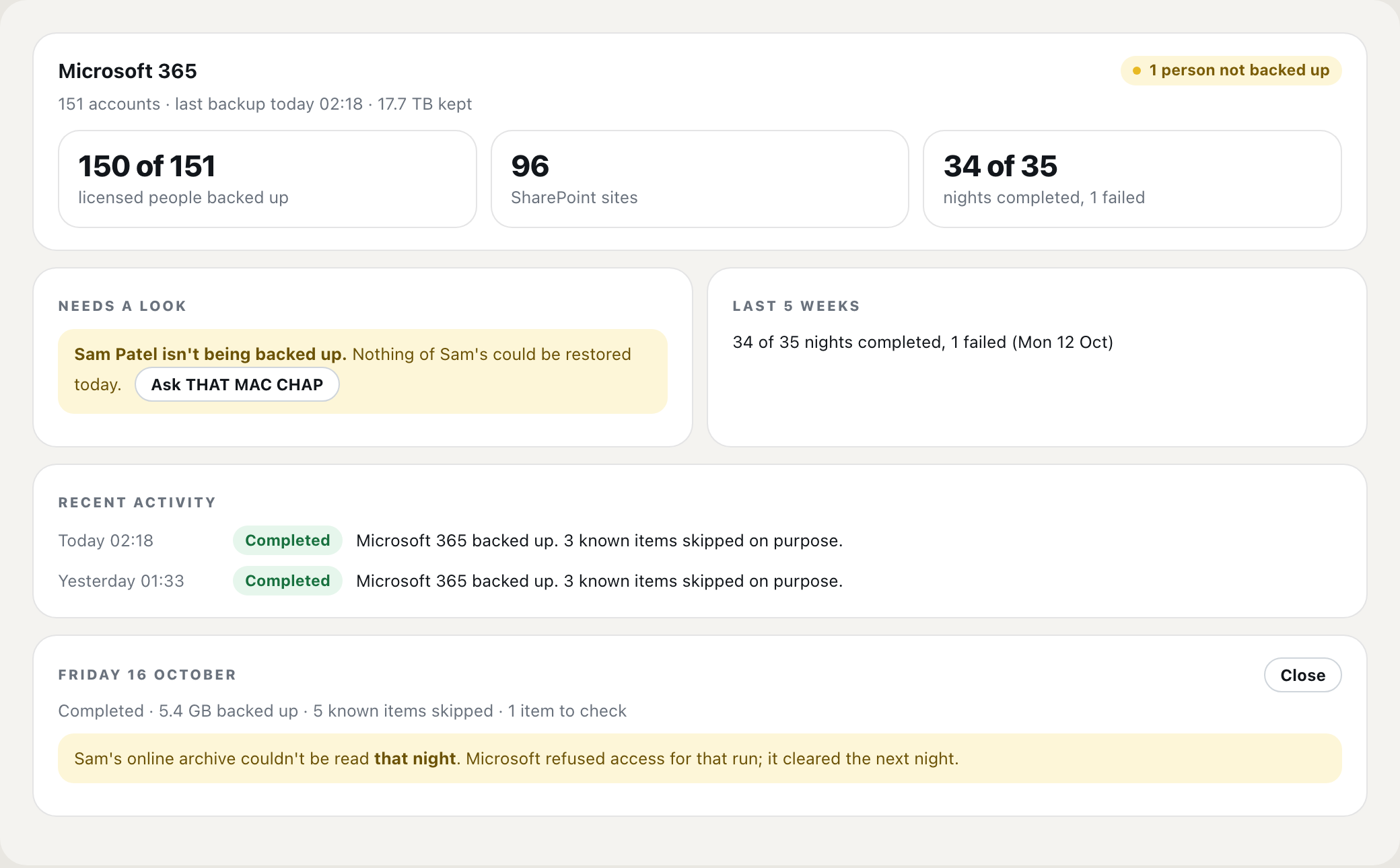
Every night, every account. If one person isn’t backed up, it says so by name. (An example, with a made-up studio.)
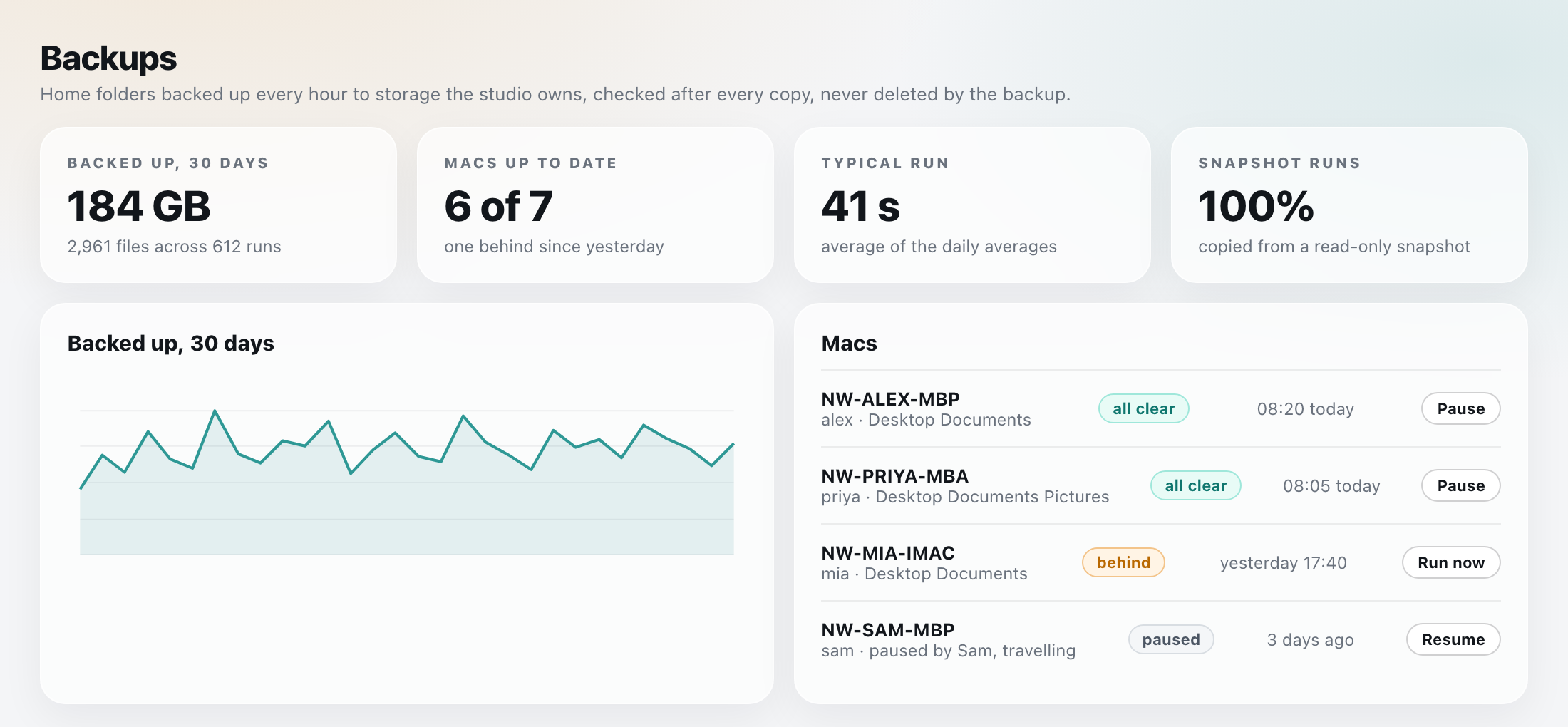
Through the day, every Mac, with a plain status for each one. (An example, with a made-up studio.)